

How to Use Mudfish VPN to Get Better FFXIV Ping
Orth
2025-11-23
FFXIV is known for having outdated servers, so it's no surprise if some players struggle with high ping, or packet loss.
I will teach you how to install Mudfish VPN in Windows and Linux, and how you should configure it for an optimal connection speed.
There are many VPNs and proxies available for FFXIV, I have tested many of them, but I always go back to Mudfish, due to its extensive configuration and affordable price.
How to get Mudfish?
To create your account, you can go to https://mudfish.net/signup.
For Download, all clients are available at https://mudfish.net/download, this includes Windows, Mac OS X, and Linux.
For Linux, you can run it with the command /opt/mudfish/6.1.2/bin/mudrun -N -B. Replace 6.1.2 with the current mudfish version.
Best Mudfish settings for FFXIV
Mudfish allows for a variety of different configurations to improve your ping.
After running Mudfish, go to http://127.0.0.1:8282/item/list.html and search for the item "Final Fantasy XIV: A Realm Reborn".
Add the item, and on "Game Server Location" select the datacenter you play at. If you are unsure which data center you are at, select the location closest to you.
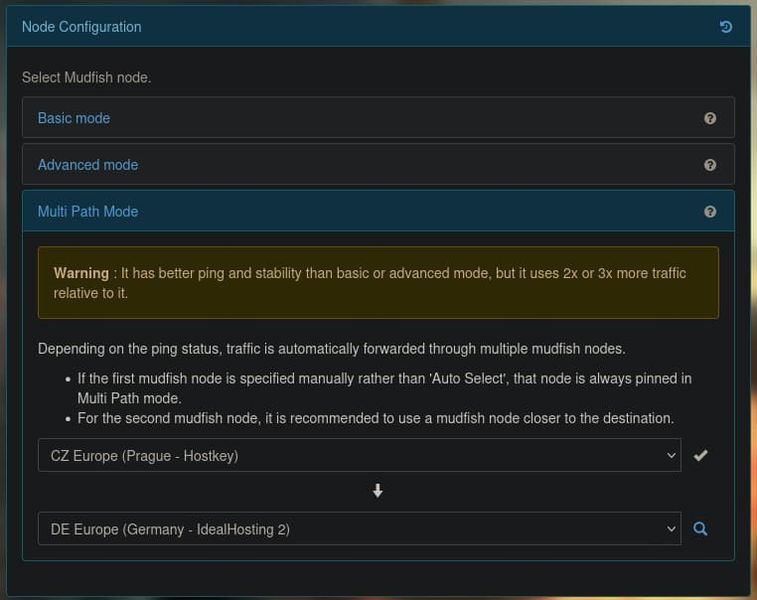
On "Node Configuration", I've got the best results from Multi Path Mode. Here is how to set it up:
- •Select Multi Path Mode
- •Click on the magnifying glass icon to search for servers
- •Pick your server location
- •Wait for the Shortest Path screen to load
- •Select the first one, this is the shortest path available between you and the game server!
Other settings:
- •FastConnect mode: off
- •Full VPN mode: off
- •NAT Open mode: off
After that is done, you can click on Connect and check your FFXIV ping.
Understanding the Settings
Multi Path Mode sends your data through a server and then to another server, very powerful as it has more potential to avoid slow routes. This increases your credit consumption(doubles it).
Basic Mode uses a single optimized route, Mudfish will try to pick the best option for general usage. You can use this for casual content, gold saucer, etc.
FastConnect Mode: This is not useful for FFXIV. It's an optimization for applications which depend on specific network packets.
Full VPN Mode: Keep this OFF. This makes ALL your data go through Mudfish, it will consume more credits, by keeping it off, so only FFXIV will be proxied.
NAT Open Mode: Leave this off. Turn it on if you have specific issues, like Docker issues on Linux, some techy scenarios.
How much Mudfish costs?
Mudfish is cheaper compared to other services, it only charges for how much you actually use, while other services charge you a fixed monthly rate.
I have charged my account 5 USD and used it for months without it running out, it depends on your usage.
If you are using it only for FFXIV, it's important to leave the Full VPN option off, this way, only FFXIV traffic will be routed through the VPN.
You may also switch to Basic Mode when not doing hard content, as it uses less credits than the multi path mode.
FAQ
- •Is Mudfish against TOS?
No, Mudfish is not against TOS. It intercepts the route your network packets take to reach the game server—it does not change these packets in any malicious way.
- •How to know if Mudfish is working?
On the dashboard at http://127.0.0.1:8282/ you can see the Realtime RTT section, it will show how much latency you are getting from the game servers.
- •Does Mudfish help with packet loss too?
Yes, it can improve packet loss significantly, often the packet loss is caused by some faulty route next to the server, in FFXIV this is very common on the Sacramento server, which serves the NA region. Mudfish can help your packets "go around" these problematic routes.
If Mudfish does not improve your packet loss, you may want to contact your ISP, as the packet loss might be happening very close to your region.
- •My FFXIV is freezing every few seconds, what is it?
That is exactly packet loss, you can test Mudfish to solve this problem.
- •Can I use Mudfish for other games?
Yes, you can add more Mudfish items like you did for FFXIV. Just keep in mind that some games might consume more bandwidth than others, keep an eye on your credit usage.
Conclusion
With a quick 10-minute setup, you should be able to notice ping and packet loss improvements. And with a single 5 USD charge, you are able to enjoy this for months!
If there's any update around the FFXIV item or new settings, I will make sure to update this guide.